


Page 46 - MSDN Magazine, November 2018
P. 46
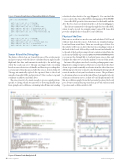
Figure 3 SensorDiveData and SensorHurdleData Classes
calculated values back to the app (Figure 2). You can find the source code for the SensorKit SDK for diving apps at bit.ly/2ImaNQT. SensorKit SDK provides data structures for the hurdle and the dive. The two classes are depicted in the code shown in Figure 3. This data is transmitted to the app through the SensorKit SDK, where it can be stored, for example using Cosmos DB. SensorKit
provides a helpful class to handle Cosmos DB data.
Physics of the Dive
Our sensors work in two modes: raw and calculated. We’ll work with raw data from the sensors, both from our simulated spring- board and from actual dives. There are several types of dives. For this article, we’ll focus on dives that start in a standing position at the back of the board, followed by a walk forward and a hurdle on to the end of the board, pressing it down to initiate a takeoff into the air. From our GitHub repository at github.com/kevinash/MSDNDivingSensor, you can use the diving.R file to load and parse sensor data, and calculate the values we used in the analytics section of this article.
In terms of the physics involved, consider pushing against some- thing heavy coming toward you. The force you exert slows the object down, stops it and eventually accelerates it in the other direction. All this impacts the way we must look at finding the diving takeoff events from the velocity and acceleration curves. The problem is to determine where we are in the takeoff based on angular velocity or linear acceleration curves. A chart of board displacement looks like an oscillation graph: From the horizontal position the board goes down to its max flexion point, then goes back via horizontal 0 position and oscillates until it’s still.
public class SensorDiveData {
public long t { get; set; } // Timestamp
public double dt { get; set; } // Duration
public double count { get; set; } // Hurdle count
public double g { get; set; } // Acceleration, m/s^2 public double w { get; set; } // Angular velocity, dps public double angle { get; set; } // Max flexion angle, deg
}
public class SensorHurdleData {
public long t { get; set; } // Timestamp
public double dt { get; set; } // Duration
public double angle { get; set; } // Flexion angle, deg public double g { get; set; } // Acceleration
public double w { get; set; } // Angular velocity, dps
}
Sensor Kit and the Diving App
The data is collected on our SensorKit sensor. The accelerometer and gyroscope provide the data to calculate flexion angle, hurdle flight and dive data, and transmit it wirelessly to the mobile app where the coach can see it. The app can trigger video recording based on sensor detection of a hurdle, and then stop recording after a set amount of time has passed after the sensor-detected takeoff. The app automatically uploads the captured data to the cloud using the SensorKit SDK, and provides a UI for coaches to tag and comment on athletes and their dives.
The sensor needs to be smart enough to process signal patterns specific to diving, which we narrowed to detecting hurdle steps from springboard oscillations, estimating takeoff time and sending
Figure 4 Sensor Data Analysis in R 40 msdn magazine
Artificial Intelligence


