


Page 55 - MSDN Magazine, November 2018
P. 55
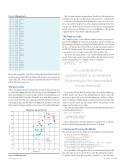
Figure 2 Kidney Data
The 30-item dataset is artificial and should be self-explanatory for the most part. The sex field is encoded as male = -1 and female = +1. Because the data has three dimensions (age, sex, test score), it’s not possible to display it in a two-dimensional graph. But you can get a good idea of the structure of the data by examining the graph of just age and kidney test score in Figure 3. The graph suggests that the data may be linearly separable.
The Program Code
The complete demo code, with a few minor edits to save space, is presented in Figure 4. At the top of the Editor window, I removed all namespace references and replaced them with the ones shown in the code listing. The various Microsoft.ML namespaces house all ML.NET functionality. The System.Threading.Tasks namespace is needed to save or load a trained ML.NET model to file.
The demo program defines a class named KidneyData, nested inside the main program class, that defines the internal structure of the training data. For example, the first column is:
[Column(ordinal: "0", name: "Age")] public float Age;
You can think of the pipeline object as an untrained ML model plus the data needed to train the model.
Notice that the age field is declared type float rather than type double. In ML, type float is the default numeric type because the increase in precision you get from using type double is almost never worth the resulting memory and performance penalty. The value-to-predict must use the name “Label,” but predictor field names can be whatever you like.
The demo program defines a nested class named KidneyPrediction to hold model predictions:
public class KidneyPrediction {
[ColumnName("PredictedLabel")] public string PredictedLabels;
}
The column name “PredictedLabel” is required but, as shown, the associated string identifier doesn’t have to match.
Creating and Training the Model
The demo program creates an ML model using these seven statements:
var pipeline = new LearningPipeline(); string dataPath = "..\\..\\KidneyData.txt"; pipeline.Add(new TextLoader(dataPath).
CreateFrom<KidneyData>(separator: ','));
pipeline.Add(new Dictionarizer("Label"));
pipeline.Add(new ColumnConcatenator("Features", "Age", "Sex", "Kidney")); pipeline.Add(new LogisticRegressionBinaryClassifier());
pipeline.Add(new PredictedLabelColumnOriginalValueConverter()
{ PredictedLabelColumn = "PredictedLabel" });
You can think of the pipeline object as an untrained ML model plus the data needed to train the model. Recall that the values- to-predict in the data file are either “survive” or “die.” Because
November 2018 49
48, +1, 4.40, survive 60, -1, 7.89, die 51, -1, 3.48, survive 66, -1, 8.41, die 40, +1, 3.05, survive 44, +1, 4.56, survive 80, -1, 6.91, die 52, -1, 5.69, survive 56, -1, 4.01, survive 55, -1, 4.48, survive 72, +1, 5.97, survive 57, -1, 6.71, die 50, -1, 6.40, survive 80, -1, 6.67, die 69, +1, 5.79, survive 39, -1, 5.42, survive 68, -1, 7.61, die 47, +1, 3.24, survive 45, +1, 4.29, survive 79, +1, 7.44, die 44, -1, 2.55, survive 52, +1, 3.71, survive 55, +1, 5.56, die 76, -1, 7.80, die 51, -1, 5.94, survive 46, +1, 5.52, survive 48, -1, 3.25, survive 58, +1, 4.71, survive 44, +1, 2.52, survive 68, -1, 8.38, die
the global .csproj file. Ugh. Then I did a Build | Rebuild Solution and was successful. When working with preview-mode libraries such as ML.NET, you should expect glitches like this to be the rule rather than the exception.
The Demo Data
After creating the skeleton of the demo program, the next step was to create the training data file. The data is presented in Figure 2. In the Solution Explorer window, I right-clicked on the Kidney project and selected Add | New Item. From the new item dialog window, I selected the Text File type and named it KidneyData.txt. If you’re following along, copy the data from Figure 2 and paste it into the editor window, being careful not to have any extra trailing blank lines.
9.00 8.00 7.00 6.00 5.00 4.00 3.00 2.00 1.00
0.0
Kidney Data - Age and Test Score
Die Survive
0 10 20 30 40 50 60 70 80 90 Patient Age
Figure 3 Kidney Data msdnmagazine.com
Kidney Test Score


